Skip to content
Platform overview

One workspace. Every part of the operation.

Dispatch, tickets, projects, invoicing, fleet, time, partners, and reports, all sharing the same jobs, customers, and crew. Nothing gets typed twice.

Aerial view of a construction site with trucks and earthmoving equipment
Dispatch & Live MapDispatch plan

Know where every truck is, and where it's headed next.

  • Single dispatches. Assign one driver to one haul with pickup, destination, project, material, and equipment.
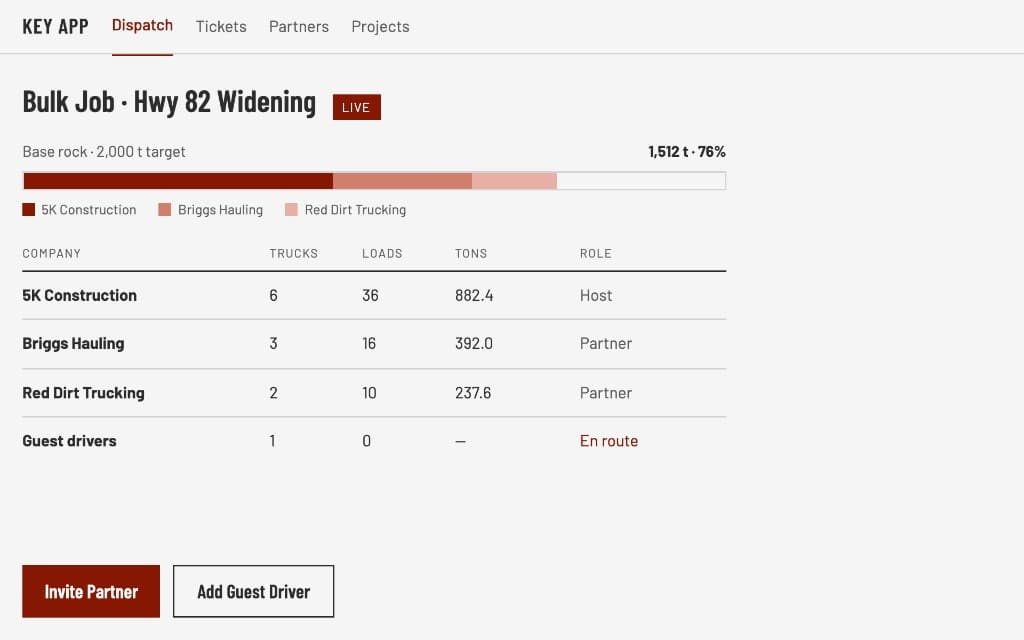
  • Bulk dispatches. Put multiple drivers on one job working toward a shared target in tons, barrels, or loads, with a progress bar that fills as loads come in.
  • Driver app with navigation. Drivers accept the job, see the route and ETA to pickup and then to the site, and update status with one tap: accepted, loaded, delivered.
See Dispatch & Live Map
Digital Tickets & ApprovalsCore and up

No more lost tickets. No more retyping.

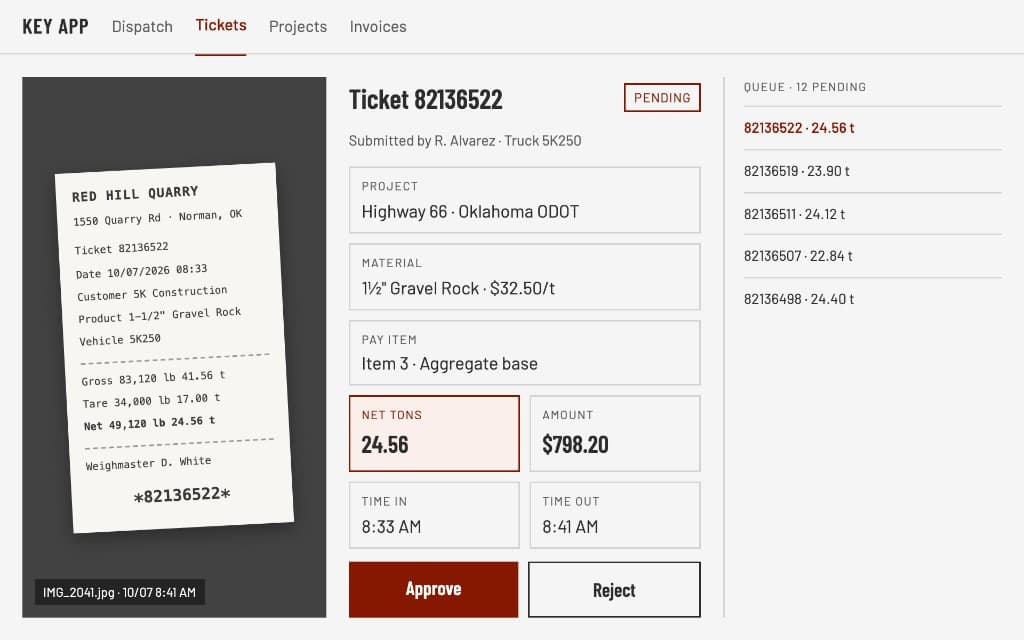
  • Proof of delivery from the field. Drivers attach a photo of the scale ticket or BOL right from the job on their phone.
  • Office entry and upload. Office staff upload ticket photos in batches and enter or correct details such as ticket number, weights, material, and vendor.
  • Approval queues. Separate review queues for scale tickets, BOLs, and field tickets, each showing pending, approved, and rejected.
See Digital Tickets & Approvals
Ticket review screen: a quarry scale ticket photo beside its project, material, pay item, and net tons, with Approve and Reject buttons and a queue of pending tickets
Field, Service & Liquid TicketsCore and up

Signed, approved, and invoiced before the truck leaves the site.

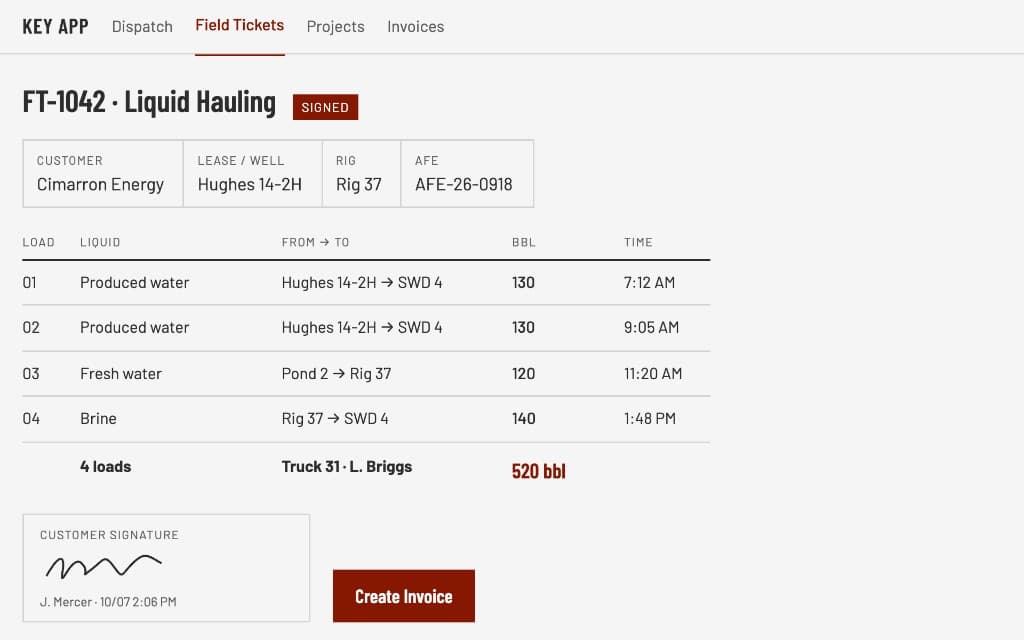
  • Liquid hauling tickets. Loads and barrels by liquid type (fresh water, brine, disposal, washout, oil-based mud), plus rig, well, and AFE details.
  • Item delivery tickets. Quantity, description, miles, and price lines.
  • Service tickets. Lease, rig, PO, and service code fields, with line items and manager approval.
See Field, Service & Liquid Tickets
Signed liquid hauling field ticket listing four loads and 520 barrels, with the customer's signature and a Create Invoice button
Projects & Job CostingCore and up

See exactly where every job stands, and whether it's making money.

  • Two kinds of jobs. Simple time-and-materials jobs, and pay-item jobs for DOT and unit-price contracts with planned quantities and unit prices.
  • Stations and layers. Organize road work by station limits and construction layers, with estimated versus actual cost.
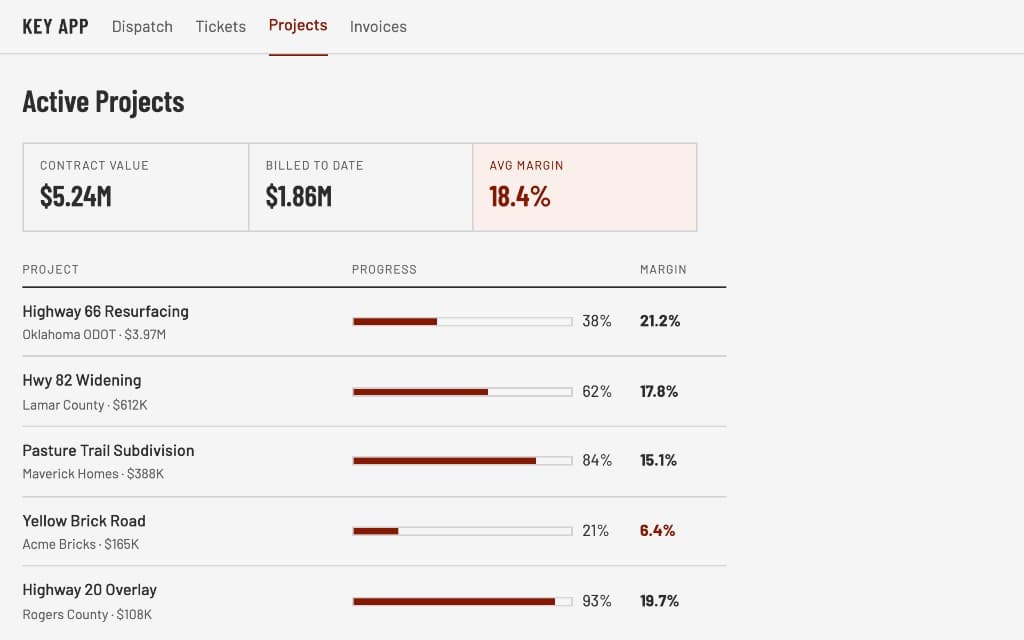
  • Plan versus actual progress. See completed quantity and value against the plan for every pay item, with percent complete.
See Projects & Job Costing
Active projects dashboard with contract value, billed to date, and average margin, plus progress and margin for each project
Quotes, Invoicing & ARCore and up

Quote faster. Invoice sooner. Get paid on time.

  • Quotes in minutes. Add line items with units and prices, apply discounts, mark quotes accepted, and send a branded PDF. On the Dispatch plan, prices fill in from your materials library.
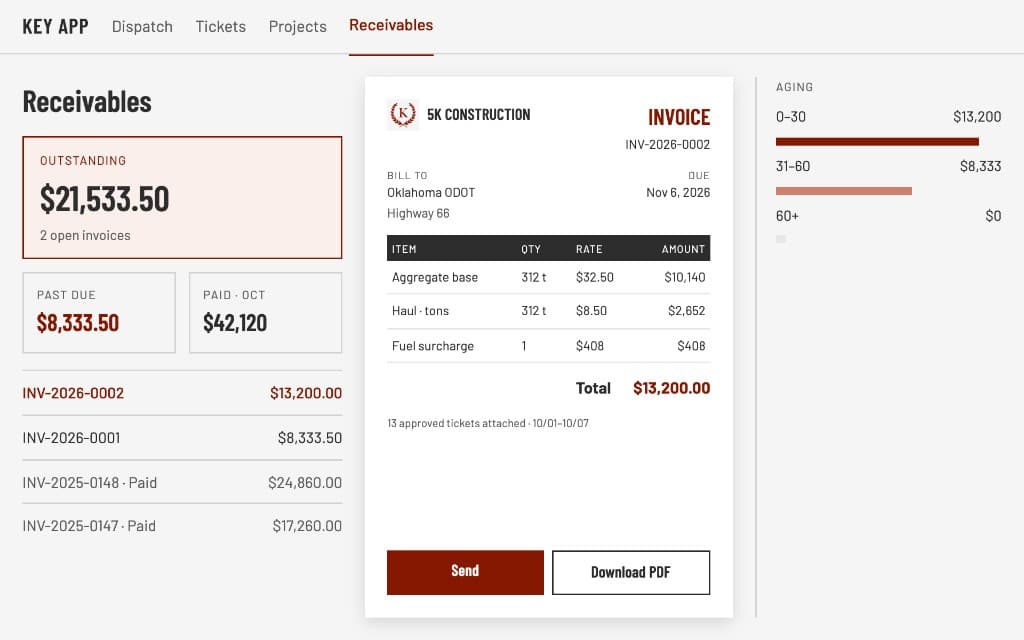
  • Invoices from real work. Create invoices directly from approved tickets on a project, or add lines by hand.
  • Payment terms. Net 15, Net 30, Net 60, or a custom due date, calculated for you.
See Quotes, Invoicing & AR
Receivables screen with outstanding and past-due totals, aging bars, and a branded invoice built from approved tickets
Fleet, Maintenance & InspectionsOperations and up

Keep every truck safe, inspected, and on the road.

  • Equipment records. Every truck, trailer, and machine with status (active, needs maintenance, out of service, retired), assignments, documents, and permit details.
  • Digital DVIRs. Drivers complete DOT-style tractor and trailer inspections on their phone. Reports with defects alert the shop, and clean reports close themselves.
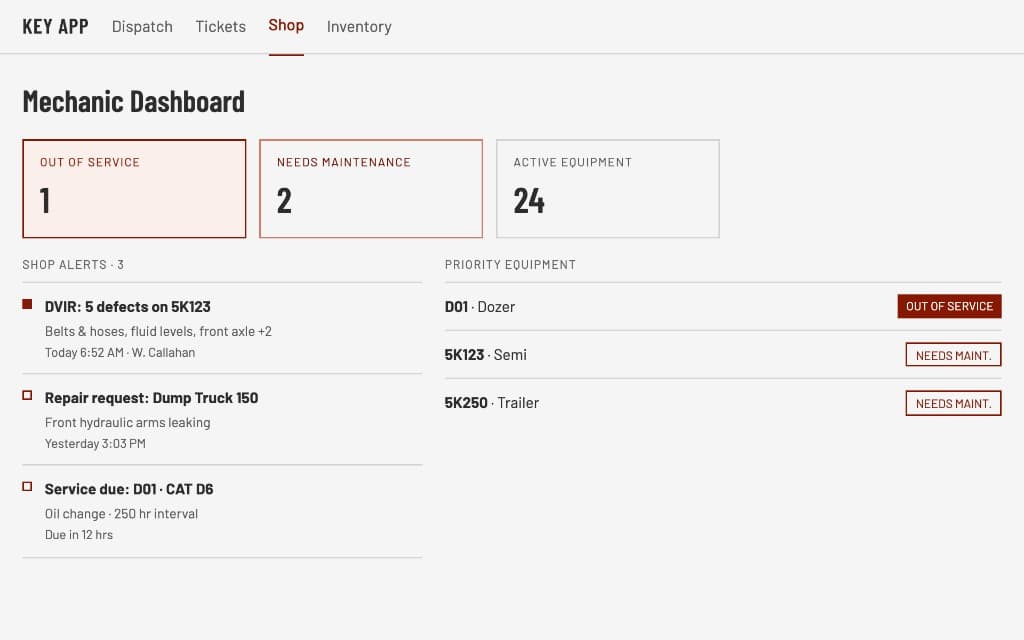
  • Mechanic dashboard. Shop alerts, fleet health at a glance, and quick access to log service.
See Fleet, Maintenance & Inspections
Mechanic dashboard with out-of-service and needs-maintenance counts, shop alerts, and priority equipment
Time Tracking & PayrollOperations and up

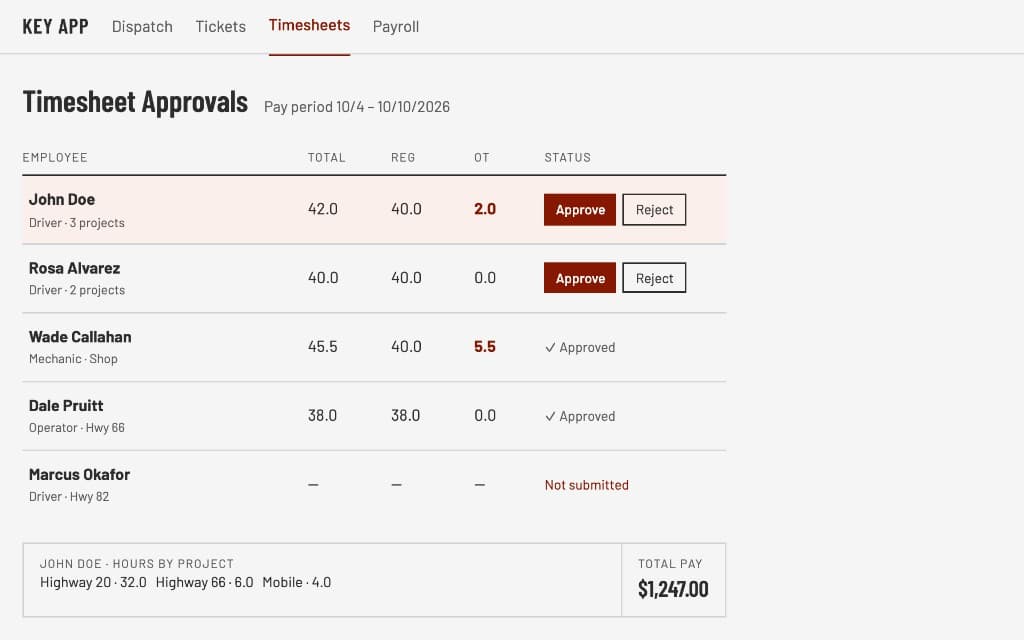
Timesheets that fill themselves in and approve in a click.

  • Clock in and out from the phone. With optional GPS verification, tied to a project, yard, or piece of equipment.
  • Weekly timesheets. Employees review their week and submit it for the pay period.
  • Auto-submit. Timesheets submit themselves on the day and time you choose.
See Time Tracking & Payroll
Timesheet approvals for a pay period, with regular and overtime hours per employee, Approve and Reject buttons, and one employee's hours by project
Partners & Guest DriversDispatch plan

Bring in extra trucks without losing control.

  • Partner companies. Invite another company that uses Key App by email or link. Share bulk jobs with them, and they assign their own drivers.
  • Your data stays yours. Partners see only what they need to haul the job: project and material names, and their own drivers and loads. Never your customers, pricing, employees, or other partners.
  • Tickets stay with you. Every load a partner hauls is recorded under your company.
See Partners & Guest Drivers
Bulk job progress bar split between the host company and two partner companies, with trucks, loads, and tons for each
Reports & ComplianceCore and up

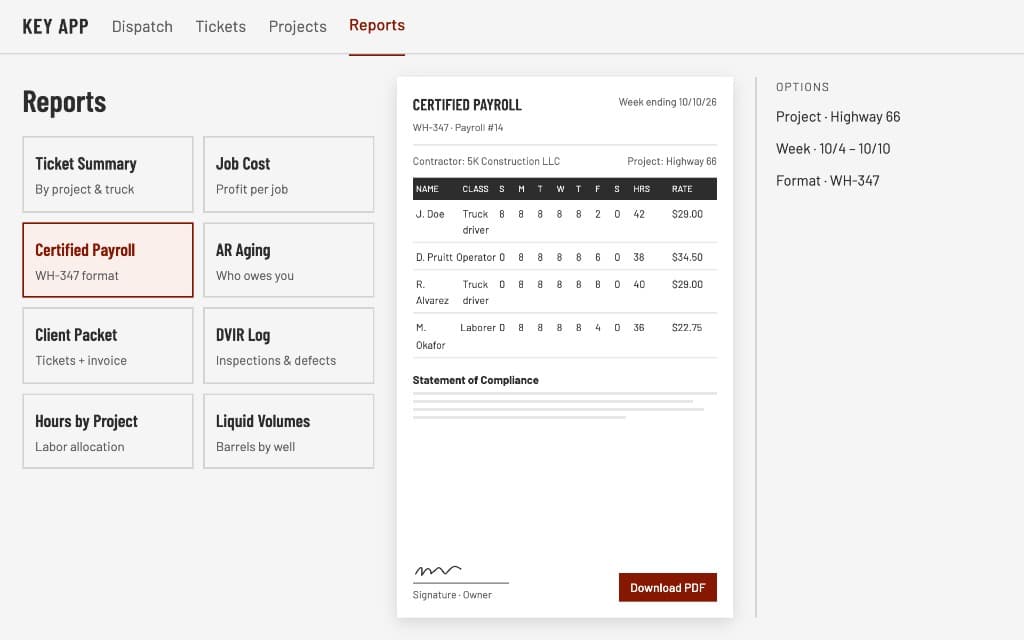
The reports your clients, auditors, and accountant ask for, in one click.

  • Ticket report. Deliveries by date, project, and status, with ticket images.
  • Project client packet. A client-ready package of tickets, field tickets, invoices, payments, labor, and equipment for a job.
  • Pay item progress. Plan versus actual quantities, percent complete, and value earned.
See Reports & Compliance
Reports hub with a certified payroll report previewed in WH-347 format and a Download PDF button
Supporting tools

The pieces that hold it all together

  • Customers

    Contacts, addresses, and each customer's full job and billing history.

  • Dispatch plan

    Materials library

    Your materials with cost (what you pay) and price (what you charge), used across dispatches, quotes, and pay items.

  • Reminders

    To-dos you can assign to teammates and link to projects.

  • Roles and permissions

    Ready-made roles for managers, office, drivers, operators, and mechanics, plus custom roles.

  • Company branding

    Your logo, contact details, and brand color on every quote, invoice, ticket, and report.

  • Notifications

    In-app and push alerts for new jobs, deliveries, inspection defects, and maintenance requests.

Roles and permissions

Each person sees only what their job needs

Give someone a role and Key App shows them the right screens. Drivers see their jobs, the office sees approvals and invoices, and managers see it all.

  • Manager

    Sees every job, cost, and approval across the company.

  • Dispatcher

    Creates jobs, assigns drivers, and watches the live map.

  • Office

    Approves tickets, sends invoices, and runs timesheets.

  • Driver

    Gets jobs, captures tickets, clocks in, and completes DVIRs.

  • Operator

    Logs hours, borrow pit loads, and field tickets from the job.

  • Mechanic

    Gets defect alerts, logs repairs, and manages parts.

  • Custom roles

    Build your own role and choose exactly what it can see and do.

Web and mobile

Most features work on both

The field crew does everything from their phone. The iPhone and Android apps are included in every plan.

On the web

Owners, dispatchers, and the office
  • Build projects, quotes, and invoices
  • Dispatch jobs and watch the live map
  • Approve tickets and timesheets
  • Run reports and export PDF or CSV
  • Set up roles, branding, and company settings

On the phone

Drivers, operators, and mechanics
  • Accept jobs and follow the route
  • Snap tickets and collect signatures
  • Clock in and out
  • Complete DVIRs and log repairs
  • Managers can dispatch and approve from anywhere

Ready to ditch the paper?

Set up your company, invite the crew, and send your first dispatch today.